

For most Northeast Ohio homes, running Power over Ethernet (PoE) cable gives you the most reliable, always-on camera system, while wireless suits temporary setups or spots where drilling isn’t an option. NEC 2023 changed how communications cables get routed and separated, which is one more reason to call Tri-County Services Electric & Plumbing before you start drilling through exterior walls. If you’re unsure which route fits your house, call (440) 253-0332 for a site survey before buying anything.
TL;DR:
- Power over Ethernet provides a reliable, always-on connection with cable runs up to 100 meters, ideal for long-distance outdoor or detached building coverage.
- Wired PoE systems generally offer more consistent service and uninterrupted recording compared to wireless setups, which depend on Wi-Fi strength and battery life.
- Proper cable selection requires matching cable type, ratings, and connectors to the installation environment, with outdoor or in-wall runs needing specific weatherproof or fire-rated cables.
- Exterior wiring must be protected with conduit or raceway, kept separated from high-voltage lines, and installed with water seals and surge protection to ensure safety and compliance.
- Professional installation by certified electricians can save time, ensure code adherence, and prevent costly mistakes, especially for underground, exterior, or near electrical system work.
Table of Contents
- Wired vs Wireless Security Cameras: Which Fits Your Home?
- Cables, Connectors, and Ratings Homeowners Should Know
- Planning Camera Wiring Routes and Outdoor Protection
- Step-by-Step: From Camera to Recorder
- Testing and Maintaining Your Camera Wiring
- Why Safety and Code Compliance Should Drive Your Decision
- Let Tri-County Services Electric & Plumbing Handle the Wiring
- Sources
- FAQ
Wired vs Wireless Security Cameras: Which Fits Your Home?
The word “wireless” trips up a lot of homeowners. A wireless camera usually means the video feed travels over Wi-Fi, but the camera still needs power from somewhere, either a nearby outlet or a battery you’ll be charging every few weeks. That distinction between video transmission and power matters more than most product listings let on.
PoE solves both problems with one cable. A single Ethernet run carries power and data together, which means no outlet hunting and no battery swaps. Reolink’s installation guidance notes that PoE cameras handle runs up to roughly 100 meters, or 328 feet, before signal quality becomes a concern. That’s usually more than enough cable to reach a detached garage or a far corner of a yard.
Wired systems generally deliver more consistent, always-on coverage, while wireless setups win on flexibility and quick installation. Neither is universally correct. Here’s what tends to tip the decision:
- Wi-Fi strength at the camera location — weak signal at the edge of your property favors a wired PoE run over a wireless camera.
- Willingness to drill and route cable — if you’re not comfortable opening walls or soffits, wireless avoids that step entirely.
- Distance from the router or switch — long runs favor PoE’s stability over Wi-Fi’s range limitations.
- Need for continuous, uninterrupted recording — wired systems don’t drop out during Wi-Fi congestion or battery depletion.
Cables, Connectors, and Ratings Homeowners Should Know
Not all cable is interchangeable, even though it often looks the same on a spool. Cat5e handles most PoE camera installs fine, but Cat6 is worth the upgrade for longer runs, higher resolution cameras, or if you want headroom for future network upgrades. Shielded Cat6a shows up in installs near electrical panels or other sources of interference.
Older analog and some CCTV systems still rely on coax, typically RG59 or RG6, sometimes bundled as Siamese cable that combines video and power in one jacket. If you’re replacing an older analog system, matching connector types matters just as much as matching cable grade.
Cable ratings aren’t cosmetic. Indoor plenum spaces require CMP-rated cable because it resists fire and smoke spread differently than standard jacketing. Riser-rated CMR cable belongs in vertical runs between floors. Anything routed outdoors needs a jacket rated for UV exposure and moisture, not standard indoor cable pressed into service because it was already on hand.
A few things worth confirming before you buy materials:
- Cat5e or Cat6 for PoE runs, sized to your longest planned cable path.
- RG59/RG6 or Siamese cable only if you’re matching an existing analog system.
- CMP or CMR rating for any cable passing through attics, plenums, or between floors.
- RJ45 connectors for Ethernet, BNC connectors for coax, and weatherproof pigtails for any outdoor power connection.
Planning Camera Wiring Routes and Outdoor Protection
The shortest path isn’t always the right path. Code requires certain separation between low-voltage communications cable and high-voltage electrical wiring, and running your camera cable alongside a 120-volt line without that separation can cause interference or, worse, a safety hazard down the line.
Exterior runs need real protection, not just weatherproof cable. Conduit or raceway shields the line from sun, ice, and the trimmer that catches everything at the property edge. At every entry point into the house, a drip loop and a bead of silicone sealant keep water from following the cable straight into your wall.
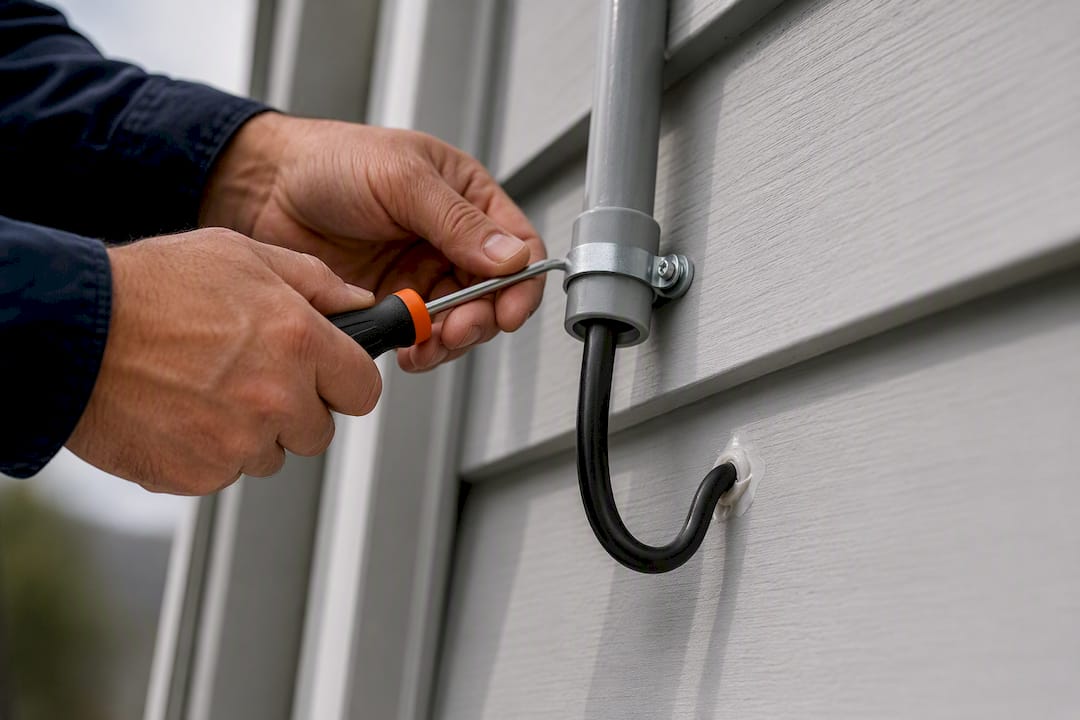
Burying cable adds another layer of complexity. Conduit is generally recommended for any underground run, but burial depth requirements vary depending on conduit type and local code, which is exactly the kind of detail worth confirming with a professional before you rent a trencher.
Pro Tip: If your camera run will sit near a lightning-prone area or feed into an outside-plant Ethernet switch, add surge protection at both ends. A single strike can take out a camera, a switch, and whatever else shares that circuit.
- Plan the shortest protected path, not the shortest possible path.
- Keep low-voltage cable separated from electrical mains per code.
- Use conduit for any exposed or buried exterior run.
- Seal every entry point with a drip loop and silicone.
Step-by-Step: From Camera to Recorder
A clean install follows the same order every time, whether you’re wiring one camera or eight.
- Survey the site first. Walk the property and note field of view, mounting height (commonly 8 to 12 feet indoors), and measure the actual cable run to each camera location.
- Choose your power method. Decide between PoE and a plug-in camera based on the survey, then confirm your switch or injector can handle the total load.
- Gather tools and materials. A drill, fish tape, Cat5e or Cat6 cable, an RJ45 crimper, a BNC crimper if you’re running coax, conduit, silicone sealant, and cable labels cover most jobs.
- Run the cable. Leave service loops at both ends, secure the run with cable clips every few feet, avoid sharp 90-degree bends that stress the internal wiring, and label both ends as you go.
- Terminate the connections. Follow the T568B wiring standard for RJ45 ends, crimp BNC connectors firmly if you’re on coax, and weatherproof any termination that sits outside.
- Address power and redundancy. A PoE switch or injector handles camera power directly; a small UPS on your recorder or NVR keeps footage recording through a brief outage.
Steps one through three are reasonable for a hands-on homeowner to research. Once you’re drilling through exterior walls, working near electrical panels, or burying conduit, that’s where calling a professional stops being optional and starts being the smart move.
Testing and Maintaining Your Camera Wiring
Test in order: power first, then the PoE link light, then the actual video feed, then camera angle, then night vision performance after dark. Skipping steps makes troubleshooting harder later, because you won’t know which layer failed.
Most wiring problems trace back to a handful of usual suspects: a bad crimp, a nicked cable jacket, a PoE switch pushing more load than its budget allows, or an IP address conflict on the NVR. Homeowners can safely check visible cable damage and confirm a camera has power. Once the problem involves the switch’s PoE budget or network configuration, that’s a job for someone who works with these systems daily.
- Label every cable at both ends and keep a simple map of runs.
- Check outdoor seals and drip loops once a year.
- Update camera and NVR firmware when updates are available.
- Call a professional if PoE link lights won’t establish or video feed drops randomly.
Why Safety and Code Compliance Should Drive Your Decision
Camera wiring looks simple until you’re mixing low-voltage runs with attic insulation, electrical panels, and code you haven’t read. That’s where a family-owned, certified crew earns its keep. Tri-County Services Electric & Plumbing has served Northeast Ohio since 1975, and a quick call to (440) 253-0332 gets you a proper site survey before anything gets drilled, avoiding guesswork.
— Lindsay Paramore
Let Tri-County Services Electric & Plumbing Handle the Wiring
Here’s the real advantage: Tri-County Services Electric & Plumbing gives you a code-aware installation without the guesswork of pricing materials, calculating cable ratings, or figuring out separation requirements yourself. On a typical visit, technicians survey your property, plan routing that respects code and your home’s structure, terminate connections properly, add surge protection where it matters, and document the runs so future service calls go faster.

Scheduling works around your day, not the other way around, and every technician treats your home the way they’d want theirs treated. If your project also touches your electrical panel, capacity for a new circuit, or a future EV charger, the same crew can scope that during the same visit. Check current project pricing on the electrical pricing guide or browse the security camera installation page to see what’s included. Ready to get your cameras wired right the first time? Call (440) 253-0332 and get a site survey on the calendar.
Sources
For more on Ethernet distance limits, PoE run standards, and cable jacket ratings, review Reolink’s wiring guide, then confirm local permit rules with a professional before any exterior or buried run.
FAQ
How Far Can PoE Camera Cable Run?
PoE cameras typically run up to about 100 meters, or 328 feet, using Cat5e or Cat6 cable before signal quality drops. Longer distances usually call for fiber or a mid-run powered switch, which is worth discussing with a professional first.
Is a Wireless Camera Really Wire-Free?
Not usually. Most “wireless” cameras only transmit video over Wi-Fi and still need a power source, either a plugged-in adapter or a rechargeable battery. Truly wire-free cameras run on battery alone and need regular recharging.
Should I Bury Conduit for Outdoor Camera Cable Myself?
Burial depth requirements vary by conduit type and local code, so this isn’t a guess-and-check project. Tri-County Services Electric & Plumbing can confirm the right depth and routing for your property before any digging starts. Call (440) 253-0332 to schedule a survey.
When Should I Call a Professional Instead of Wiring Cameras Myself?
Call a professional anytime the job involves attic or soffit routing, work near your electrical panel, exterior conduit, or code questions you can’t answer confidently. Tri-County Services Electric & Plumbing has installed electrical systems across Northeast Ohio since 1975 and can handle the routing, terminations, and code compliance in one visit.
Does Cable Type Matter for Outdoor Security Camera Runs?
Yes. Outdoor runs need cable rated for UV exposure and moisture, not standard indoor Ethernet, and any run through plenum or riser spaces needs CMP or CMR rated cable to meet fire code. Using the wrong rating in the wrong space is a common and preventable wiring mistake.